


Better You Part 3
- Micole Elise

- Dec 22, 2017
- 4 min read
Congratulations! You have made it to the final part of the Better You Series! We established and wrote down our goals and then made vision boards to help us stay focused. Now we will use an everyday tool to help us keep track of these goals in order to attain them by your designated deadline. This is when a planner comes in handy! There are a million different types of planners but I am a big fan of one in particular! Create365's The Happy Planner! They offer several different designs/collections/sizes. They allow you to add in page inserts, stickers, take out pages, and add pics and momentos! It caters to whatever you need! I have 2 different Happy Planners that I plan on utilizing for next year and I wanted to share how I plan to personalize the one I mainly use! The main planner I plan to use is the one pictured below in the medium size. I feel like the medium size is perfect for the day to day things I need to remember.

I love that these planners are already sorted with monthly tabs and each monthly tab has a pre-month page where you can include important dates and keep track of what you are currently doing. After that page there is a month overview and then a weekly layout! I sync both of mine and sometimes I will use filler pages if I have a busy day and need to do a timeline.
How I personalized my Happy Planner!
I know a lot of people go through and decorate their planner as soon as they get it. I like to browse through mine first and do a month at a time. I'm indecisive and I never know when I might need to fill the daily section in with to-dos so I try not to cover the spaces up. So I added fillers in the back of my planner but you can add them wherever you need them. Sometimes I end up taking one of the fillers and putting it in with the daily pages. This is helpful if I have a hectic day and need a timeline. I also added the Home Planner Extension fillers because it includes sections for Meal Plans, Cleaning Schedules, and Budgeting!
I also grab a lot of sticker packs that look like they may match my planner and I grab wash tape that also matches. I use the stickers for designs and attention grabbers. I use the wash tape just to add a little more design aesthetic so sometimes I will outline the boxes with it. If a day has passed and I feel like I don't like the empty space, then I doodle or add other elements to it.

The beginning process on the right side of how I start designing my planner
Accessories I like to use!
I really like that Create 365 provides so many little accessories. Some of my favorite are:
Dividers
Pocket Folders
Page Protectors
Sticky Notepads
Extension Fillers
Magnetic Page Clips
Pen/Pencil Zip Bags

How to incorporate your goals into the Happy Planner
Those 3 goals you made should also have timelines. If they don't, this is the perfect time to make them. Be realistic about how long it should take you to accomplish each goal and what steps you will have to take to accomplish them. For example, if one of your goals is to write a book, then you will need to write an entire to do list on how to do so. Maybe you decide to dedicate 1 hour a day (something manageable with your lifestyle) to something for this book and if possible 1 major thing for it on the weekend like researching your target market or finding publishers. If you just want to write the book by the end of the year then your timeline will be longer than if you expect to write the book and get it published by the end of the year. Whatever the case is, pick days for the small goals along the way until you reach the ultimate goal. It may sound like a lot but it keeps you on track! I use planners to keep track of my blog topics and post but I use them even more for my day to day life. Both have their own set of goals so as you can imagine, it gets hard to keep track of them all.
One thing I plan on doing this coming year is to utilize the free downloads from the site and create some of my own. Create365 created a special hole punch for the planners so the edges fit around the discs, which is what allows you to add in or take out pages.

Free Download from the Meandmybigideas.com Site
Resources
If you are looking for more inspiration, be sure to check out their website Meandmybigideas.com. They have plenty of images, videos, and free printables. You can also find exclusive planner collections like the ones below! Also, try looking on their social media pages like Instagram.


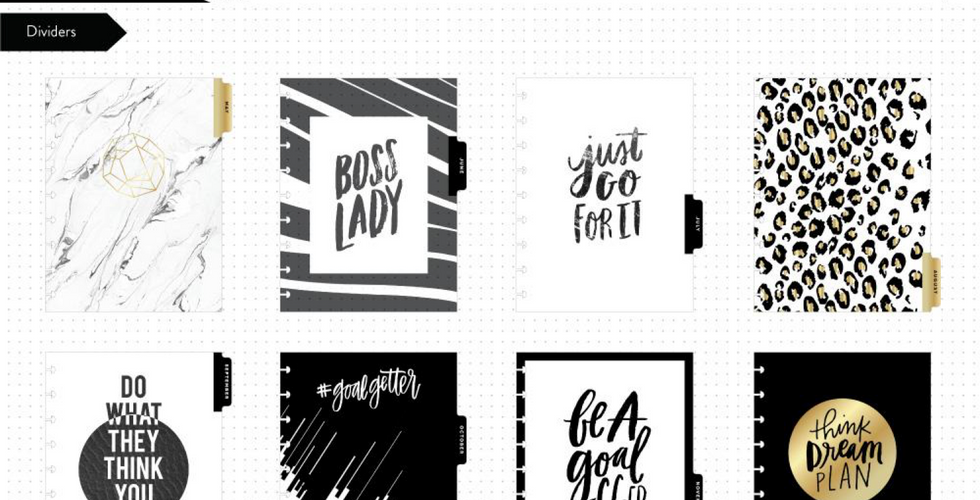


For the Exclusive Collections, visit the Me and My Big Ideas Website Here
If you are looking for where to get Happy Planners and accessories, try craft stores like Michaels, Hobby Lobby, and Joanns. These are great because you can look through each planner and use coupons.
I hope the Better You Series has helped you really think about some goals you want to achieve and how to set yourself up for success. As I said in Part 1, I wanted to keep this series short, simple, and to the point so it didn't seem like such a big ordeal. It is still worth putting the time into though. You have to realize that you are worth self investment! In the future, I would like to do a piece on bullet journaling so keep an eye for that one!
As my husband tells me (and Effie from Hunger Games), "May the odds be ever in your favor"! Good luck with your goals and if you would like to share them with us or need more support and encouragement, I would love to be apart of your process!
Special thanks to the amazing Candice J who gifted my planner and some accessories to me! She is a life saver and a sweetheart!
With Love,



Comments